- Overview
- Installation Guide for Language
- Installation Guide for Compiler
-
Syntax & Code
- User Input
- Assignment
- Data Type
- Random Number
- Casting
- String Methods
- Boolean Methods
- Basic Arithmetic
- Full Arithmetic
- List Methods
- Tuple Methods
- Set & Frozenset
- Dict Methods
- Conditionals
- Loops
- Functions
- OOP
- DSA
- Examples
- FAQ
- Release Notes
Introduction:
The Human-Centric Programming Language (HCL) bridges this gap by prioritizing intuitive, readable instructions over verbose boilerplate code. As an early prototype, HCL enables users to express ideas in everyday English sentences while generating reliable Python code behind the scenes.
Problem Statement:
The lack of a programming language that allows users to write code using simple, natural English sentences while maintaining reliability, advanced data structures, and seamless execution creates a steep learning barrier for beginners and non-programmers. Traditional languages force users to focus on rigid syntax, brackets, indentation, and boilerplate code instead of solving actual problems.
Objective:
The main objective of this project is to develop a Human-Centric Programming Language (HCL) that enables users to write programs using everyday English sentences (e.g., “set age to 42” or “create empty avl tree scores”) instead of complex syntax rules. The system uses a robust rule-based pattern-matching engine powered by actions.jsonl combined with a custom AST generator to convert these natural language instructions into correct, executable Python code. The standalone compiler (Compiler.exe) provides a modern notebook-style interface and automatically downloads a fine-tuned hybrid AI model from Hugging Face on first run, ensuring a lightweight yet powerful development experience.
Key Features:
- Modern Notebook Interface: A clean, tabbed notebook-style IDE with block-based editing, real-time output, and interactive terminal support.
- Multi-Language Execution Engine: Supports execution of Python, C, C++, and the custom HCL language within the same environment.
- AI Integration:Integrated with a locally hoste d Large Language Model using llama.cpp for future intelligent assistance. Dynamic Model Downloader:Automatically downloads the required AI model (~4 GB) from Hugging Face on first launch with progress tracking.
- Actions System & Parser:A robust actions.jsonl-based pattern matching system with a custom parser that converts natural language commands into Python Abstract Syntax Tree (AST) for execution.
- Professional Build & Distribution:Compiled as a standalone executable using Nuitka and packaged with a professional installer created using Inno Setup.
- User Experience:Features include dark/light theme support, folder tree navigation, auto-resizing blocks, save/load functionality, and an intuitive REPL mode.
Technical Architecture:
- Frontend: Custom Tkinter-based GUI with modern styling
- Backend: Custom AST Generator and execution engine (parser.py + run.py)
- AI Engine: llama.cpp with GGUF quantized model
- Build System: Nuitka (for standalone .exe)
- Installer: Inno Setup
Installation Guide for Language
System Requirements
- Operating System: Windows 10+
- Memory: 4GB RAM minimum (8GB recommended)
- Disk Space: 500MB free space
- Dependencies: Python 3.10+ (for runtime execution)
Download and Installation Steps
Windows
Phase 1: Downloading and Initializing Setup
- Download the Installer: Visit the official download page hcl-111.pages.dev/download-language and click Download HCL Language v1.0.0.
-
Verify Download:
Once completed, the file
HCL_Installer_v1.0.0.exewill appear in your browser’s download history. - Locate the Installer: Open File Explorer and navigate to your Downloads folder.
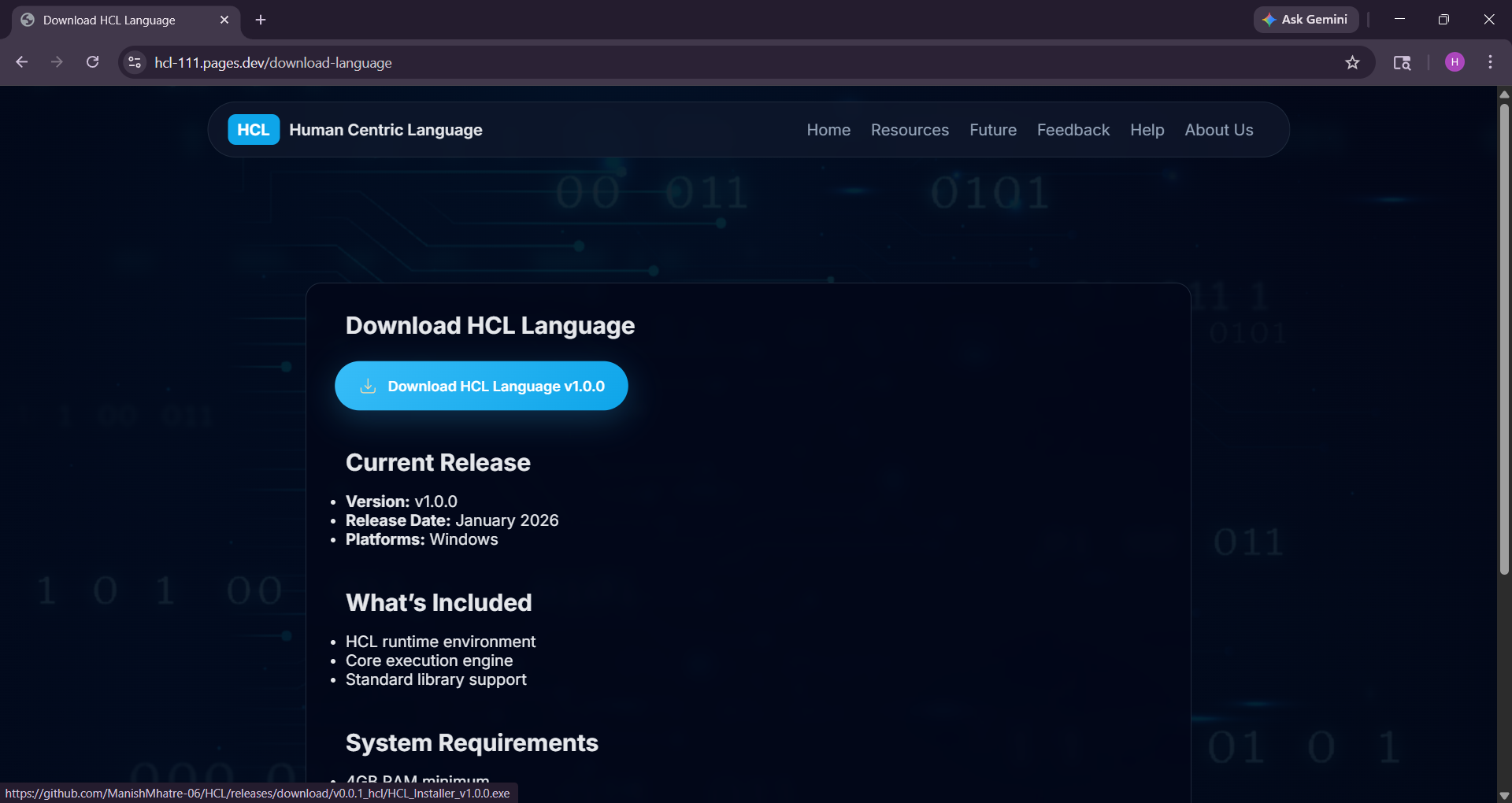

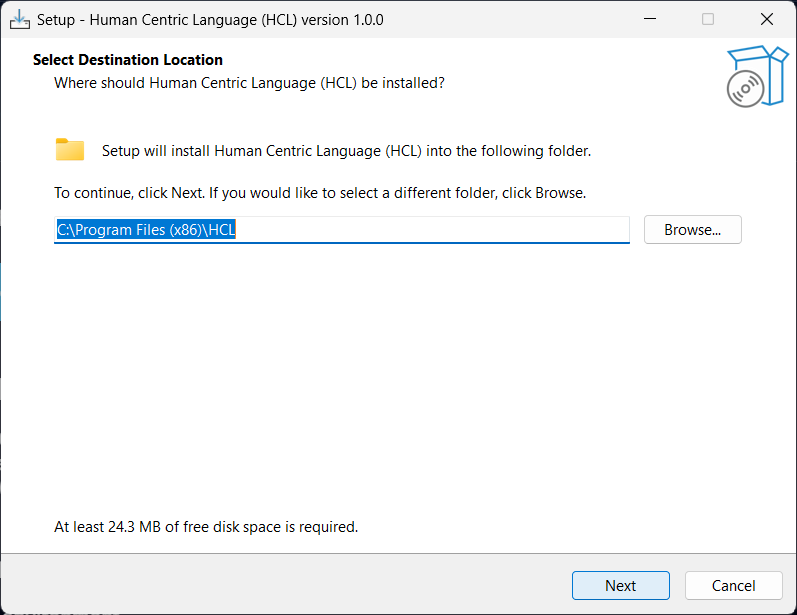
Phase 2: Installation Process
-
Select Destination Location:
Choose the installation directory. The default path is
C:\Program Files (x86)\HCL. Click Next. -
Start Menu Folder:
Select the folder name for program shortcuts (default:
HCL). Click Next. - Additional Tasks: Optionally enable Create Desktop Shortcut for quick access. Click Next.
- Review and Install: Confirm your settings and click Install to begin installation.
- Installation Progress: The installer will extract files and configure the environment automatically.
- Complete Setup: Once installation finishes, click Finish to exit the setup wizard.
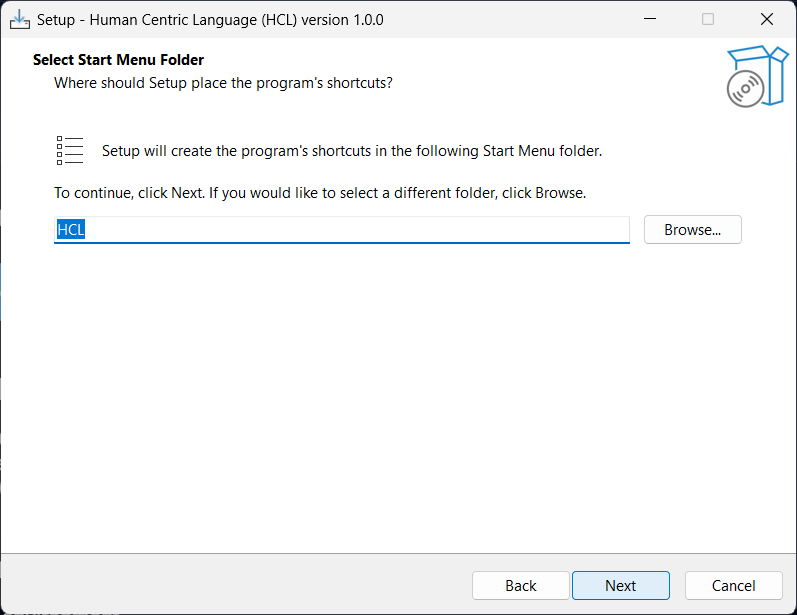
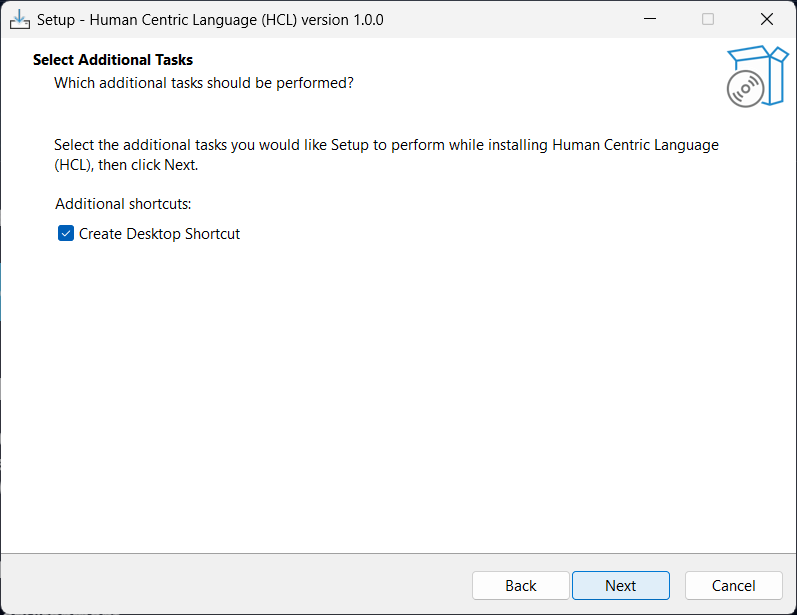
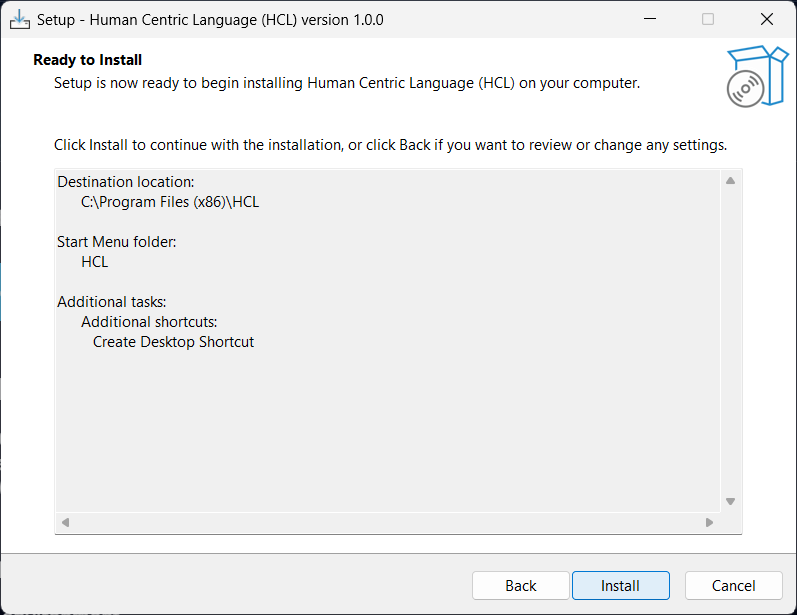
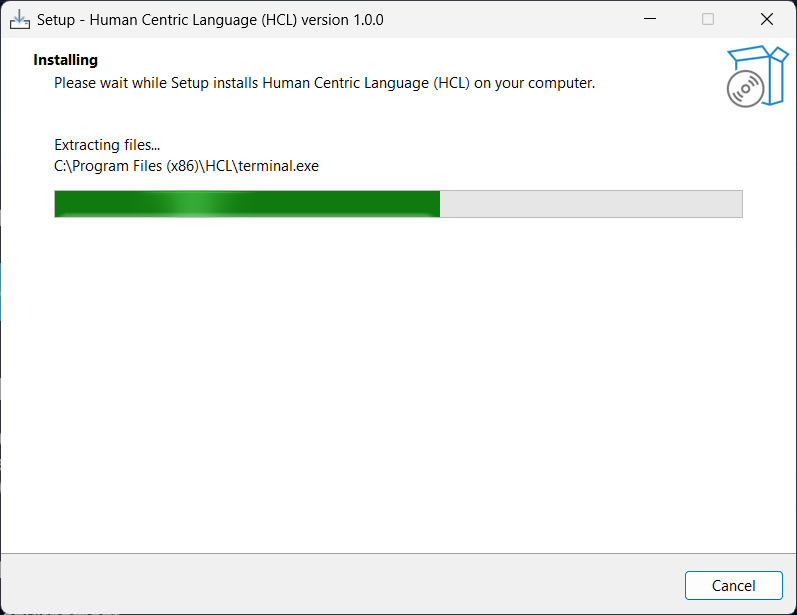
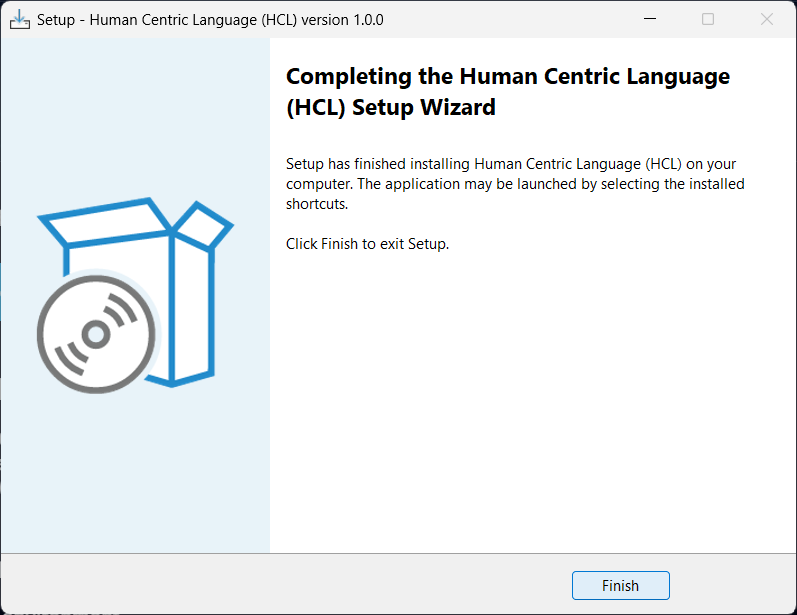
Phase 3: Verifying Installation & Running HCL
-
Verify Installed Files:
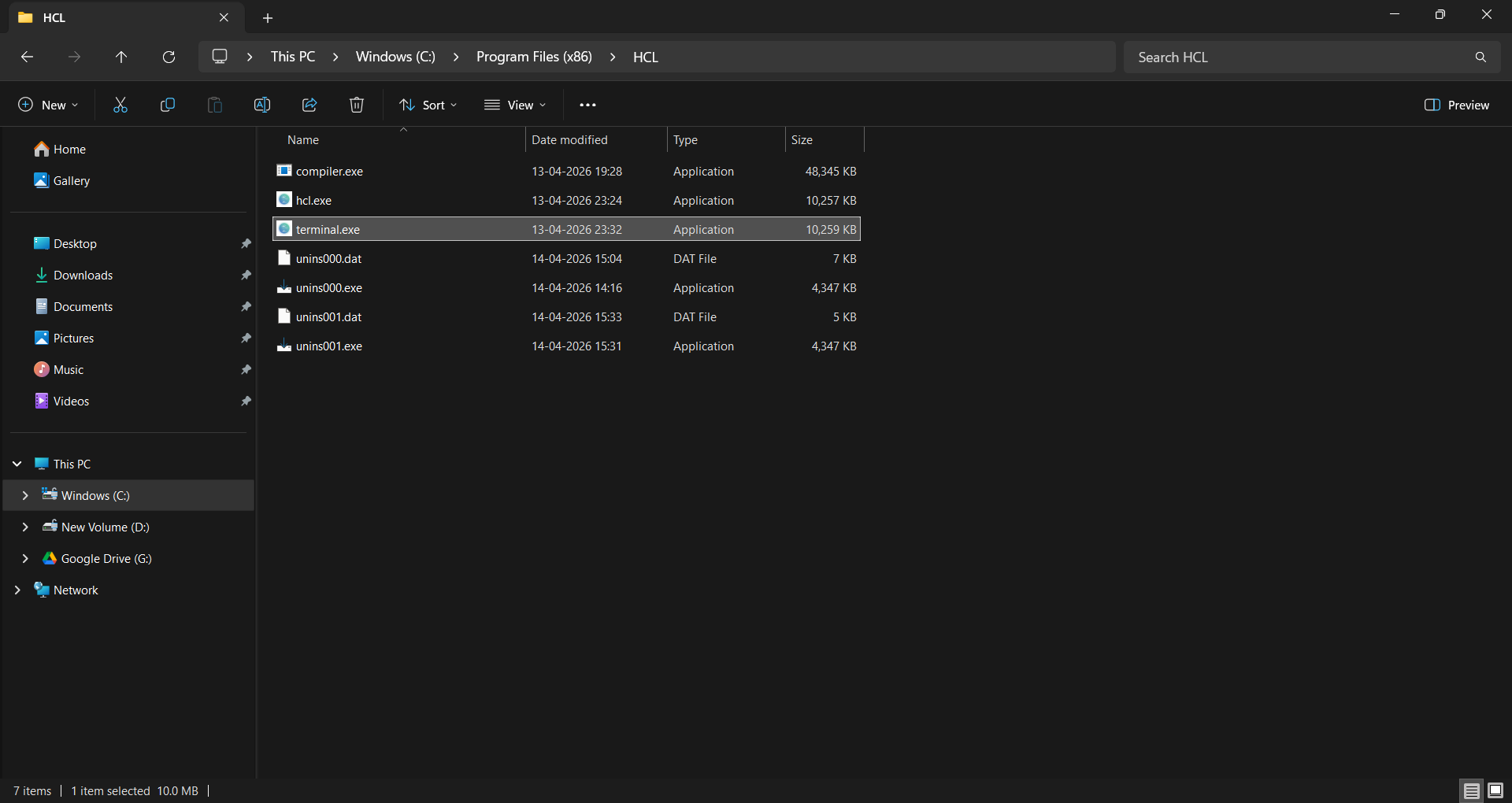
Navigate to
C:\Program Files (x86)\HCL. You should see files likehcl.exe,compiler.exe, andterminal.exe. -
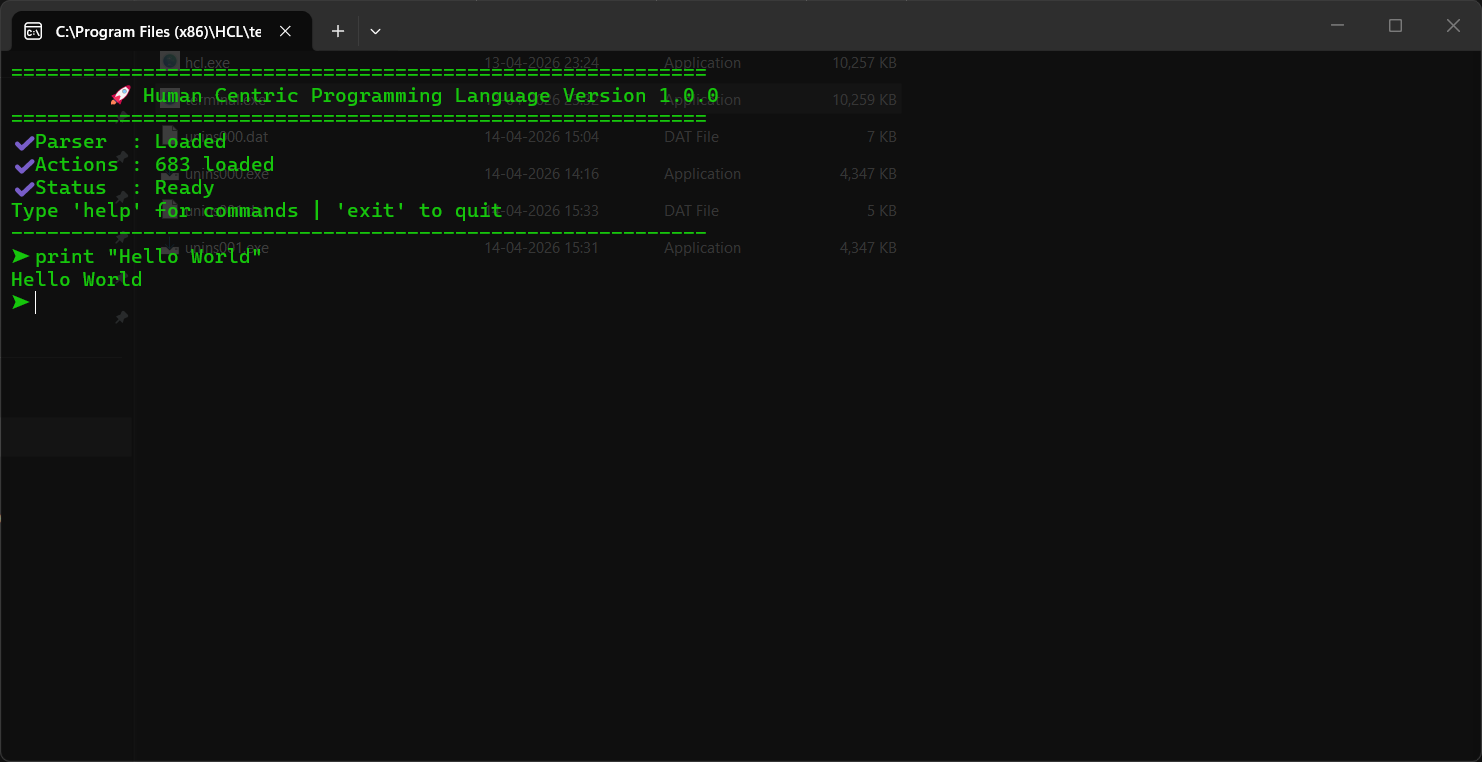
Run HCL Terminal:
Open
terminal.exeto launch the HCL REPL environment. Once you see the system status logs and prompt, HCL is ready to use.
Installation Guide for Compiler
System Requirements
- Operating System: Windows 10+
- Memory: 4GB RAM minimum (8GB recommended)
- Disk Space: 6GB free space
- Dependencies: Python 3.10+ (for runtime execution)
Download and Installation Steps
Windows
Phase 1: Downloading and Initializing Setup
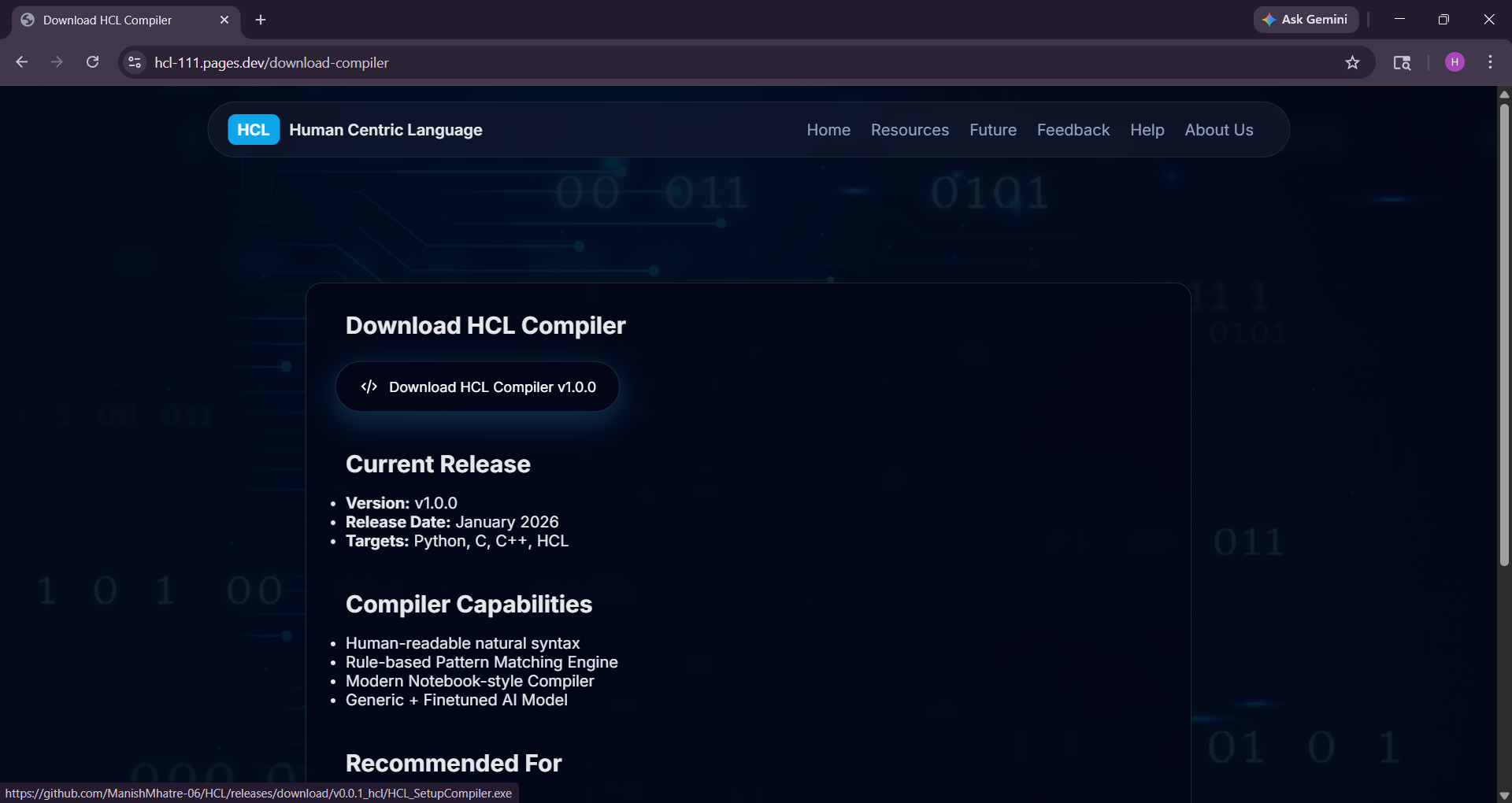
- Download the Compiler Installer: Visit the official download page hcl-111.pages.dev/download-compiler and click Download HCL Compiler v1.0.0.
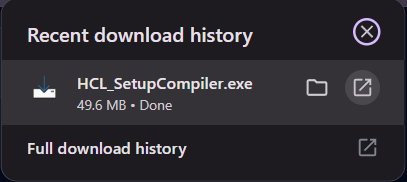
-
Verify Download:
After completion, the file
HCL_SetupCompiler.exewill appear in your browser’s download history.
Phase 2: Installation Process
-
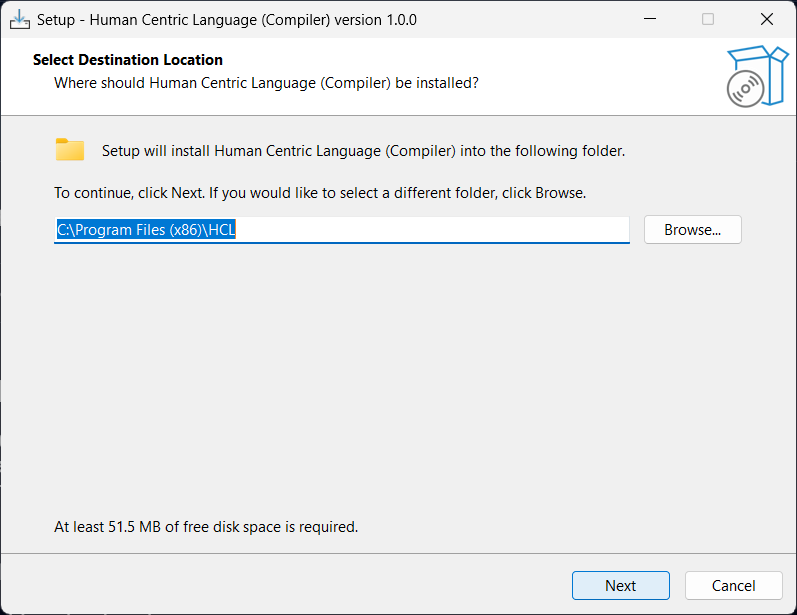
Select Destination Location:
Choose the installation directory. The default path is
C:\Program Files (x86)\HCL. Click Next. -
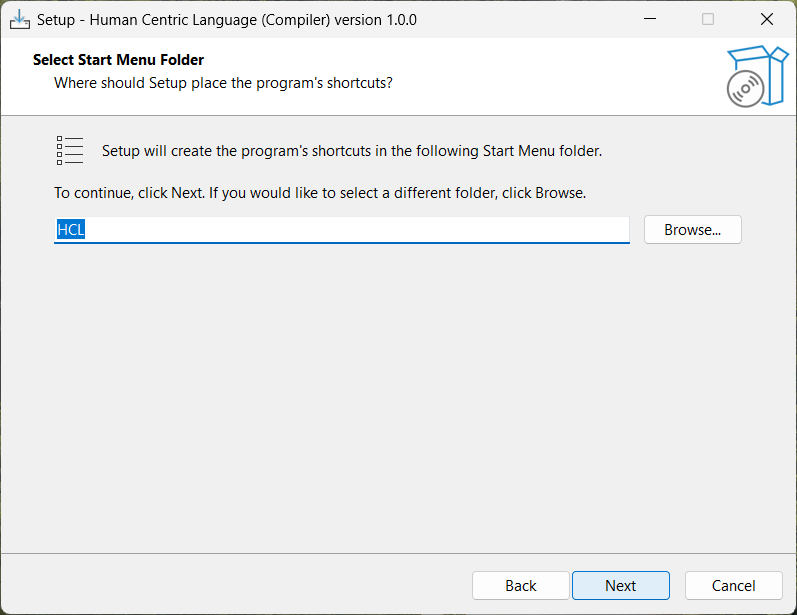
Start Menu Folder:
Select the folder for program shortcuts (default:
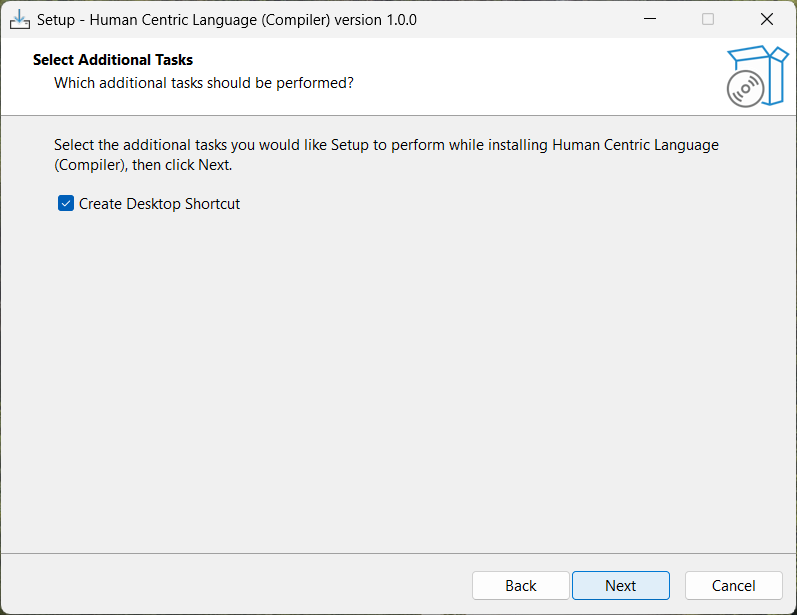
HCL). Click Next. - Additional Tasks: Optionally enable Create Desktop Shortcut for quick access. Click Next.
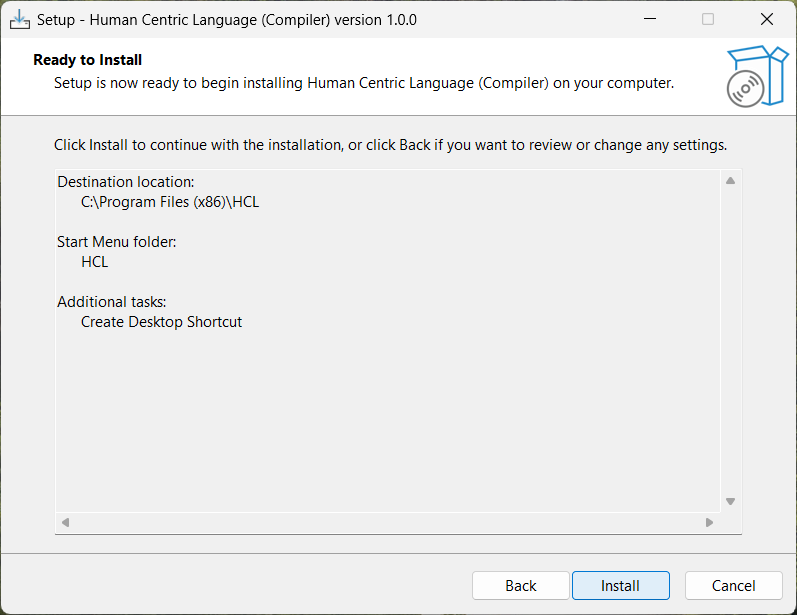
- Review and Install: Confirm your settings and click Install to begin installation.
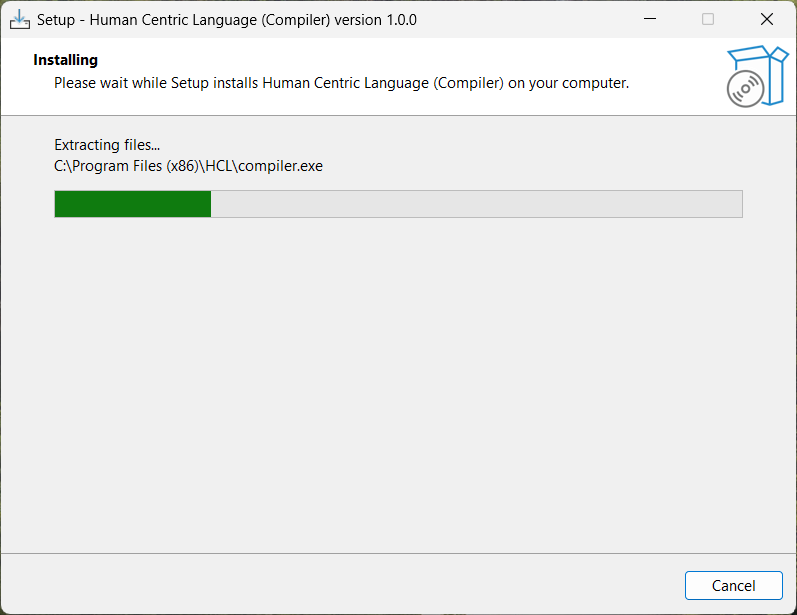
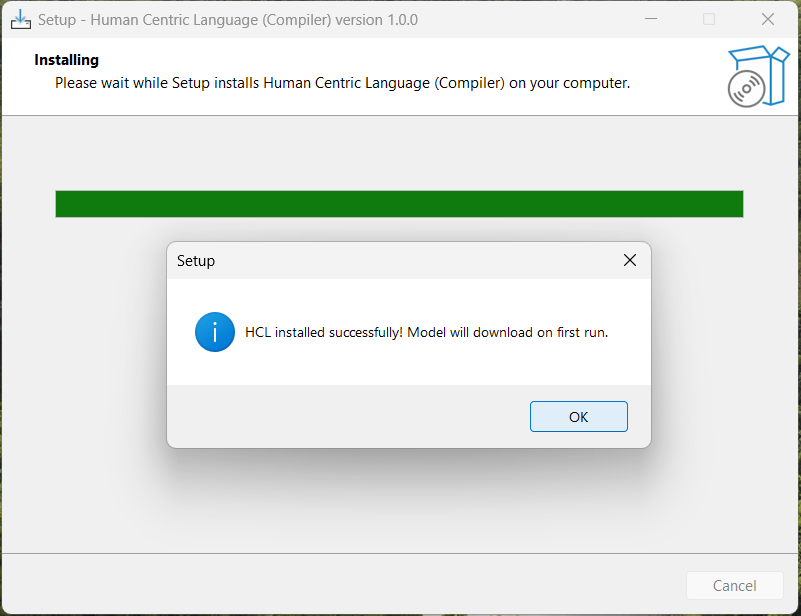
- Installation Progress: The installer will extract files and configure the compiler environment.
- Installation Confirmation: A confirmation dialog will indicate that the compiler was installed successfully. Click OK.
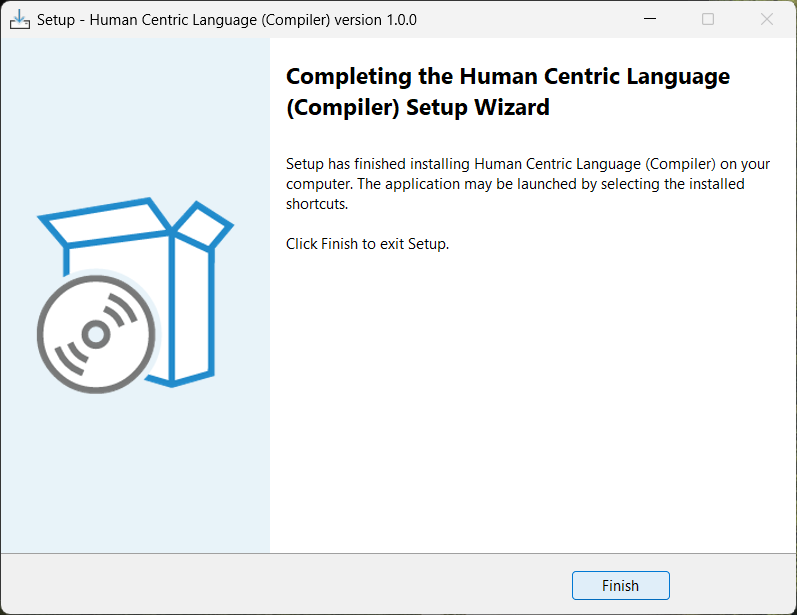
- Complete Setup: Click Finish to exit the setup wizard.
Phase 3: Verifying Installation & Running Compiler
-
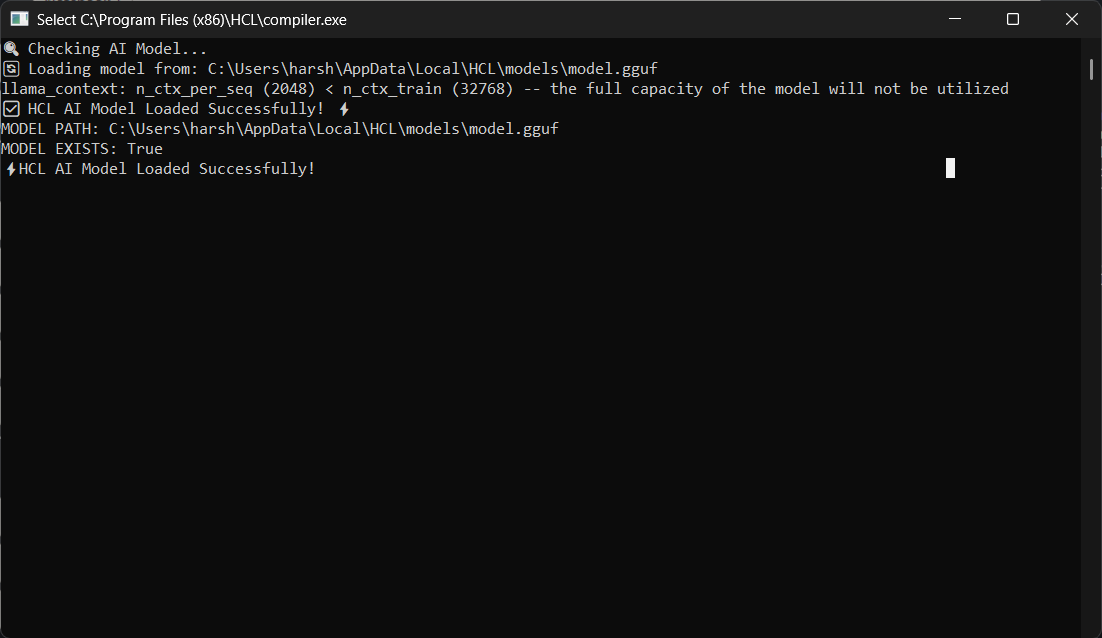
Verify AI Model Initialization:
Launch
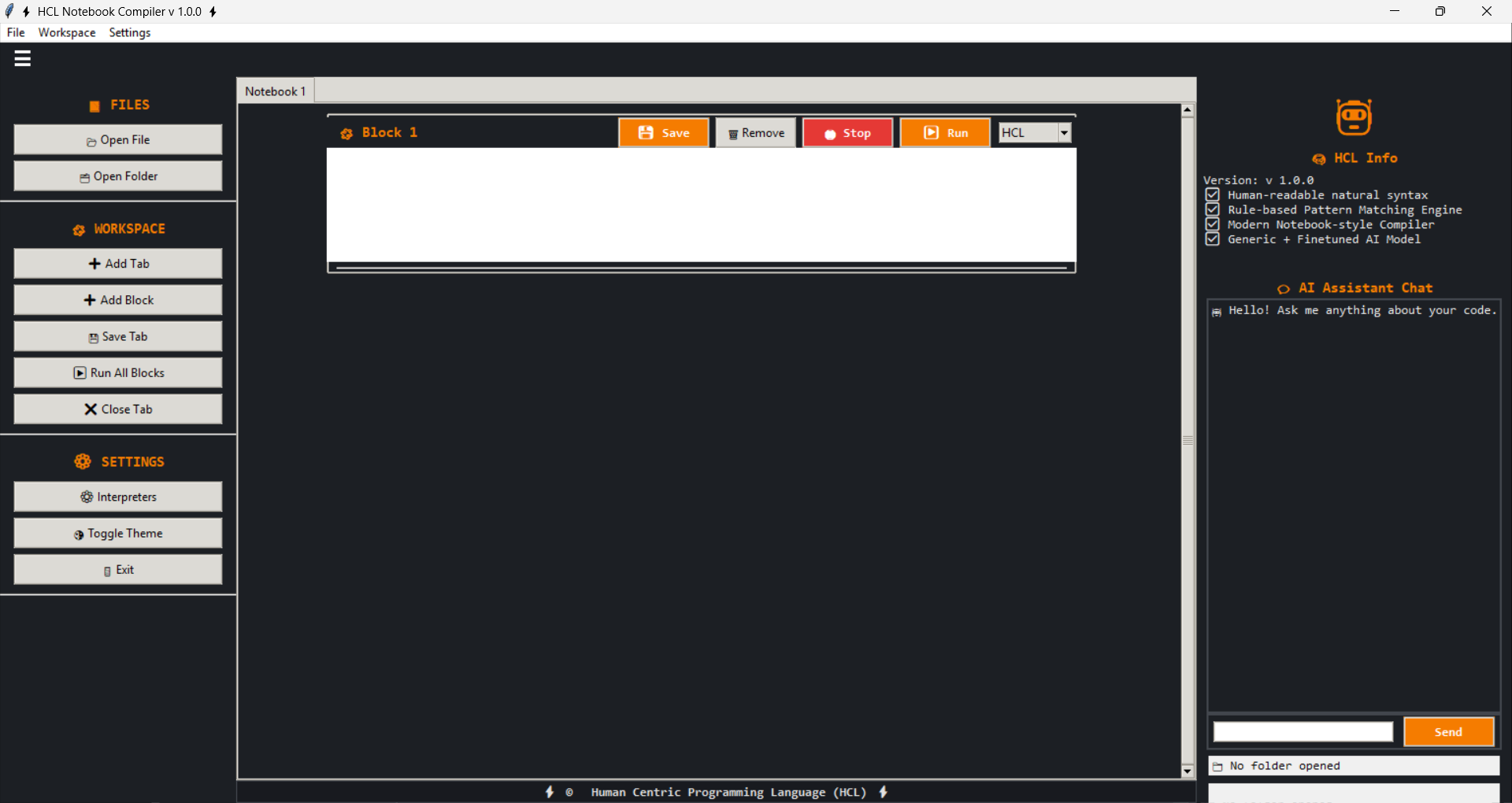
compiler.exe. The system will check and load the AI model automatically. Ensure you see "HCL AI Model Loaded Successfully" in the console. - Open Notebook Compiler Interface: Launch the HCL Notebook Compiler UI to start writing and executing code blocks interactively.
Syntax & Code
How HCL Interprets Human Prompts
HCL uses natural language processing to convert human-readable instructions into executable code. The language is designed to be intuitive while maintaining precision.
# Basic printing
print "Hello World!"
display "Hello World!"
print "Hello World!" endprint

# Printing using variables
assign "Hello " to x
assign "World!" to y
print x plus y
User Input
get user input and store var1
get input and store var2
Assignment
# Single variable assignment
assign "Hello World!" to var1
make variable var2 equal to "Hello World!"
store "Hello World!" in var3

# Multiple variable assignment (explicit values)
create variables x, y, z and set them to "A", "B", "C"

# Multiple variable assignment (same value)
assign "A" to x, y, z
set x, y, z to "A"
make variables x, y, z equal to "A"
Data Types
# Checking data types
assign 34 to x
type of x

assign 3.14 to y
check type of y

assign "Johnny" to z
check type of z
Random Number
generate a random number between 1 and 10
Casting
# Casting numbers to string
assign 10 to a
convert a to string
assign convert a to string to b

# Casting string to integer
assign "123" to c
convert c to integer
assign convert c to integer to d

# Casting string to float
assign "3.14" to e
convert e to float
assign convert e to float to f

# Casting string to complex number
assign "5+2j" to g
convert g to complex number
assign convert g to complex number to h

# Casting string to list
assign "abc" to i
convert i to list
assign convert i to list to j

# Casting string to tuple
assign "12" to k
convert k to tuple
assign convert k to tuple to l

# Casting string to set
assign "123" to m
convert m to set
assign convert m to set to n

# Casting string to frozenset
assign "123" to o
convert o to frozenset
assign convert o to frozenset to p

# Casting string to boolean
assign "true" to q
convert q to boolean
assign convert q to boolean to r
String Methods
# Slicing and substring
assign "HelloWorld" to d
slice d from 1 to 4
assign slice d from 1 to 4 to a

# Whitespace handling
assign " spaced text " to g
strip whitespace from g
assign strip whitespace from g to b

# Joining and concatenation
assign "hello" to i
assign "world" to j
join string i with j
assign join string i with j to k

# Escaped characters
use escaped characters "line\nnew\ttext"
escape characters "path\to\file"

# Capitalization
assign "hello" to o
capitalize o
assign capitalize o to p

# Encoding
assign "encode_this" to r
encode r
assign encode r to s

# Ends with
assign "filename.txt" to t
check if t ends with ".txt"
assign check if t ends with ".txt" to u

# Expand tabs
expand tabs of "a\tb\tc"

# Alphanumeric check
check if "abc123" alphanumeric
assign check if "abc123" alphanumeric to a

# Alphabetic check
assign "HelloWorld" to v
check if v contains only letters
assign check if v contains only letters to w

# ASCII check
assign "A" to x
check if x ascii
assign check if x ascii to y

# Decimal / digit checks
assign "12345" to y
check if y decimal
assign check if y decimal to z

# Identifier validation
assign "valid_var" to ab
check if ab valid identifier
assign check if ab valid identifier to bc

# Lowercase checks
assign "lowercase" to ad
check if ad lowercase
assign check if ad lowercase to da

# Numeric checks
assign "123" to af
check if af numeric
assign check if af numeric to fa

# Printable characters
assign "Hello" to ah
check if ah printable
assign check if ah printable to ha

# Title case checks
assign "Hello World" to ak
check if ak title case
assign check if ak title case to ka

# Uppercase checks
assign "UPPER" to am
check if am uppercase
assign check if am uppercase to ma

# Join using delimiter
assign "abc" to ao
assign "-" to ap
join ao using ap
assign join ao using ap to op

# Case conversion
assign "SAMPLE" to as
convert as to lowercase
assign convert as to lowercase to sa

# Title case conversion
assign "hello world" to ay
convert ay to title case
assign convert ay to title case to ya

# Uppercase conversion
assign "final text" to ba
convert ba to uppercase
ssign convert ba to uppercase to ab

# String indexing
assign "HELLO" to s
character at index 1 from s
assign character at index 1 from s to u

# Negative indexing
assign "PYTHON" to w
character at negative index 2 from w
assign character at negative index 2 from w to v

# Count occurrences
assign "aaaaab" to s
count "a" in s
assign count "a" in s to t

# Index lookup
assign "abracadabra" to y
find "c" inside y
assign find "c" inside y to z

# String formatting
assign "Hello {}, I m {}" to f
format f using "Swagat", "HCL"
assign format f using "Swagat", "HCL" to a
Boolean Methods
assign 5 to x
evaluate boolean of x
Basic Arithmetic
# Addition
assign 5 to a
add a and 10
assign add a and 10 to b

# Subtraction
assign 3 to f
subtract 10 from f

# Multiplication
assign 6 to k
multiply k by 3
assign multiply k by 3 to l

# Division
assign 20 to p
divide p by 4
assign divide p by 4 to q

# Modulus
assign 17 to t
set remainder of t by 3

# Floor Division
assign 17 to c1
floor divide c1 by 3
assign floor divide c1 by 3 to c2
Full Arithmetic Operations
# Addition with assignment
assign 10 to g1
increase g1 by 5

# Subtraction with assignment
assign 20 to k1
subtract 5 from k1

# Multiplication with assignment
assign 3 to o1
multiplication with assign o1 by 4

# Division with assignment
assign 30 to r1
division with assign r1 by 5

# Modulus with assignment
assign 14 to u1
set remainder of u1 by 5

# Floor division with assignment
assign 20 to x1
floor division x1 by 3

# Power with assignment
assign 2 to a2
raise a2 to power 8

# Bitwise AND
assign 12 to d2
and operator bitwise d2 with 6

# Bitwise OR
assign 6 to h2
or operator bitwise h2 with 3

# Bitwise XOR
assign 7 to l2
xor operator bitwise l2 with 2

# Shift right
assign 16 to p2
shift p2 right by 2

# Shift left
assign 5 to t2
shift t2 left by 3

# Equality
assign 5 to x2
check if x2 equals 5
assign check if x2 equals 5 to x3

# Not equal
assign 10 to b3
check if b3 is not equal to 3
assign check if b3 is not equal to 3 to b4

# Greater than
assign 8 to e3
check if e3 is greater than 4
assign check if e3 is greater than 4 to e4

# Less than
assign 4 to h3
check if h3 is less than 9
assign check if h3 is less than 9 to h4

# Greater or equal
assign 10 to k3
check if k3 is greater than or equal to 9
assign check if k3 is greater than or equal to 9 to k4

# Less or equal
assign 5 to n3
check if n3 is less than or equal to 9
assign check if n3 is less than or equal to 9 to n4

# Logical AND
assign 1 to x3
assign 0 to y3
x3 and y3 only
assign x3 and y3 only to z3

# Logical OR
assign 1 to b4
assign 0 to c4
b4 or c4
assign b4 or c4 to d4

# Not / identity / membership
assign 5 to h4
assign 7 to i4
h4 is not i4
assign h4 is not i4 to j4

# Identity and membership (positive)
assign 5 to v4
assign 5 to w4
v4 is equal to w4
assign v4 is equal to w4 to x4
List Methods
# Setting list items
assign [10,20,30] to i
i[0] = 5

# List slicing (negative)
assign [1,2,3,4,5,6] to p
take negative slice p starting 5 from end until 2
assign take negative slice p starting 5 from end until 2 to q

# List slicing
assign [1,2,3,4,5] to t
slice list t from 1 to 4
assign slice list t from 1 to 4 to u

# List contains
assign ["apple","banana"] to x
"banana" in x
assign "banana" in x to y

# Extend list
assign [10,20] to e1
e1.extend([30,40])

# Sort list
assign [3,1,2] to k1
sort k1

# Pop last item
assign [1,2,3] to p1
pop from p1
assign pop from p1 to p2

# Join lists using plus
assign [1,2] to a2
assign [3,4] to b2
join a2 to b2 lists
assign join a2 to b2 lists to c2

# Append item
assign [1,2] to e2
append 3 to e2

# Extend list with another list
assign ["a"] to i2
join ["b","c"] into i2

# Create list using constructor
assign "abc" to k2
convert k2 to list

# Delete entire list
assign ["a","b"] to p2
remove list p2

# Sort list in descending order
assign [3,1,2] to r2
sortreverse r2 descending order

# Reverse list
assign [1,2,3] to v2
reverse v2

# Get item using negative index
assign [10, 20, 30, 40] to a
get item at negative index 1 from a
assign get item at negative index 1 from a to b

# Get item by index
assign [5, 6, 7, 8] to nums
get item at index 2 from nums
assign get item at index 2 from nums to val

# Append element
assign [1, 2, 3] to l
append 4 to l

# Get index of item
assign ["apple", "banana", "mango"] to fruits
get index of "banana" from fruits

# Count occurrences
assign [1, 2, 2, 2, 3] to nums
count 2 in nums
assign count 2 in nums to c
Tuple Methods
# Tuple slicing
assign (1,2,3,4,5) to g
tuple slice g from 1 to 4
assign tuple slice g from 1 to 4 to h

# Tuple slice from start
assign ("a","b","c","d") to j
tuple slice j till 2
assign tuple slice j till 2 to k

# Tuple slice to end
assign (1,2,3,4,5) to m
tuple slice m from 2
assign tuple slice m from 2 to n

# Tuple contains
assign (11,22,33) to r
22 in r
assign 22 in r to s

# Remove item from tuple via list
assign (10,20,30) to u
removing list 20 from tuple u
assign removing list 20 from tuple u to v

# Add tuple to tuple
assign ("a","b") to y
assign ("c","d") to z
join tuple y with z
assign join tuple y with z to x

# Multiply tuple
assign (1,2) to g1
repeat tuple g1 3 times
assign repeat tuple g1 3 times to g2

# Tuple type check
assign (1,2,3) to j1
check if j1 is it tuple
assign check if j1 is it tuple to j2

# Convert tuple to list
assign (1,2,3) to m1
conversion of tuple m1 to list
assign conversion of tuple m1 to list to m2

# Convert list to tuple
assign ["a","b"] to q1
change q1 to tuple
assign change q1 to tuple to q2

# Join tuples
assign (1,2) to s1
assign (3,4) to t1
join tuple s1 and t1
assign join tuple s1 and t1 to u1

# Get tuple item by index
assign (10, 20, 30, 40) to t
get item at index 2 from t
assign get item at index 2 from t to u

# Get tuple item using negative index
assign (5, 6, 7, 8) to a
get item at negative index 1 from a
assign get item at negative index 1 from a to b

# Add item to tuple via list
assign (10, 20, 30) to t
adding list [40] to tuple t
assign adding list [40] to tuple t to u

# Add single item to tuple
assign (1, 2, 3) to t
let tuple item 3 to t
assign let tuple item 3 to t to u

# Tuple unpacking (exact)
assign (10, 20, 30) to t
tuple t to variables x, y, z

# Count occurrences
assign ("apple", "chocolate", "apple", "banana", "apple") to grocery
count "apple" in grocery
assign count "apple" in grocery to count
Set and Frozenset Methods
# Set contains
assign {1,2,3} to a
check if 2 in set a
assign check if 2 in set a to b

# Set symmetric difference
assign {1,2,3} to c1
assign {3,4,5} to d1
symmetric difference of c1 and d1

# Set intersection
assign {1,2,3} to w
assign {2,3,4} to x
common items in w and x
assign common items in w and x to y

# Set difference
assign {1,2,3,4} to o1
assign {2,4} to p1
difference of o1 and p1

# Set difference update
assign {"a","b","c"} to w1
assign {"b"} to x1
difference update set w1 using x1

# Set intersection update
assign {"a","b","c"} to l2
assign {"b"} to m2
intersection update set l2 using m2

# Set is disjoint
assign {1,2,3} to p2
assign {4,5,6} to q2
check if set p2 disjoint with q2
assign check if set p2 disjoint with q2 to r2

# Set subset check
assign {1,2} to v2
assign {1,2,3} to w2
is set v2 contained in w2
assign is set v2 contained in w2 to x2

# Set symmetric difference update
assign {1,2} to t3
assign {2,3} to u3
update set t3 with symmetric difference of u3

# Union with assignment
assign {1,2} to z3
assign {2,3} to a4
combine all elements of set z3 and a4 to result

# Set update
assign {1} to d4
assign {1,2,3} to e4
merge set e4 into set d4

# Discard item from set
assign {10,20,30,40} to nums
discard 40 from set nums

# Set union
assign {1,2,3} to a
assign {3,4,5} to b
combine all elements of set a and b to c

# Create frozenset
assign [1,2,3] to j4
make frozenset from j4
assign make frozenset from j4 to j5

# Frozenset union
assign frozenset({1,2}) to n4
assign frozenset({2,3}) to o4
combine frozensets n4 and o4
assign combine frozensets n4 and o4 to m4

# Frozenset is disjoint
assign frozenset({"x"}) to n5
assign frozenset({"y"}) to o5
do frozensets n5 and o5 share no elements
assign do frozensets n5 and o5 share no elements to p5

# Frozenset subset check
assign frozenset({1}) to p5
assign frozenset({1,2}) to q5
is frozenset p5 contained in q5
assign is frozenset p5 contained in q5 to r5
Dictionaries
# Dictionary length
assign {"a":1,"b":2,"c":3} to g
length of g
assign length of g to h

# Dictionary type check
assign {"id":101,"name":"Sam"} to j
type of j

# Get item by key
assign {"name":"John","age":30} to m
get value for key "name" from dict m
assign get value for key "name" from dict m to n

# Get item safely
assign {"name":"Alice","country":"UK"} to p
get value for key "country" from dict p safely
assign get value for key "country" from dict p safely to q

# Check if key exists
assign {"user":"Tom","role":"admin"} to s
check if key "role" exists dict s
assign check if key "role" exists dict s to t

# Get dictionary keys
assign {"name":"Mia","age":22} to u
get all keys inside dict u
assign get all keys inside dict u to v

# Get dictionary values
assign {"name":"Mia","age":22} to x1
get all values inside dict x1
assign get all values inside dict x1 to y1

# Get dictionary items
assign {"name":"Mia","age":22} to a2
get items dict a2
assign get items dict a2 to b2

# Set item in dictionary
assign {"name":"John","age":25} to d2
set key "age" to 30 in dict d2

# Update dictionary
assign {"a":1,"b":2} to g2
assign {"c":3} to h2
update dict g2 with h2

# Set default value
assign {"a":1} to q2
set default value for key "b" in dict q2

# Pop key from dictionary
assign {"name":"John","age":30} to t2
pop key "age" from dict t2

# Delete key
assign {"name":"Tom","age":40} to z3
delete key "age" from dict z3

 # Delete dictionary
assign {"x":10} to d4
remove dict d4

# Clear dictionary
assign {"a":1,"b":2,"c":3} to f4
clear f4

# Copy dictionary
assign {"name":"Sam","age":21} to i4
make a copy of dict i4 to j4
Conditionals
# Conditional statements

assign 10 to x

if x > 10 then print "Greater than 10" endprint elif x == 10 then print "Equal to 10" endprint else print "Less than 10" endprint end-if


# Nested conditional statements

if 2 < 11 then assign {1,2,3} to c1; assign {3,4,5} to d1; symmetric difference of c1 and d1; assign {1,2,3} to w; assign {2,3,4} to x; assign common items in w and x to y elif 2 > 11 then assign {1,2,3} to w; assign {2,3,4} to x; assign common items in w and x to y; if 2 < 11 then assign {1,2,3} to c1; assign {3,4,5} to d1; symmetric difference of c1 and d1; assign {1,2,3} to w; assign {2,3,4} to x; assign common items in w and x to y elif 2 > 11 then assign {1,2,3} to w; assign {2,3,4} to x; assign common items in w and x to y; if 2 < 11 then assign {1,2,3} to c1; assign {3,4,5} to d1; symmetric difference of c1 and d1; assign {1,2,3} to w; assign {2,3,4} to x; assign common items in w and x to y elif 2 > 11 then assign {1,2,3} to w; assign {2,3,4} to x; assign common items in w and x to y else print "none" endprint end-if else print "none" endprint end-if else print "none" endprint end-if

# For loop inside conditional statement

assign 5 to x

if x > 3 then for i in range(3) then print "Looping running:", i endprint end for else print "Conditional false" endprint end-if

# While loop inside conditional statement

assign 2 to x

if x < 5 then assign 0 to i; while i < 3 then print "While loop:", i endprint; increase i by 1 end loop else print "Conditional false" endprint end-if

# Function inside conditional statements

assign 10 to x

if x > 5 then define function greet then print "Hello from function" endprint end function call greet else print "No Function Call" endprint end-if

# Class inside conditional statements

assign 1 to x

if x > 5 then class Person then make constructor for class Person with self, name then assign name to self.name end constructor; define function show with self then print "Name:", self.name endprint end function end class; create object p from class Person with parameters "Manish"; call method show on object p else print "No Function Call" endprint end-if
Loops
# For Loop

for i in [1,2,3] then print i endprint end for

assign [1,2,3] to x
for i in x then print i endprint end for

for i in "HELLO WORLD" then print i endprint end for


# Nested For Loop

for i in [1,2,3] then print i endprint; for i in "HELLO WORLD " then print i endprint end for end for

# Conditional statement inside for loop

for i in range(5) then if i % 2 == 0 then print i, "Even number" endprint else print i, "Odd number" endprint end-if end for

# For loop using break

for i in fruits then print i endprint; if i == "banana" then break end-if end for

# For loop using continue

for i in fruits then if i == "banana" then continue end-if print i end for

# While loop inside for loop

for i in range(3) then print "Outer loop:", i endprint; assign 0 to j; while j < 2 then print "  Inner while:", j endprint; increase j by 1 end loop end for

# Function inside for loop

for i in [1,2,3] then print i endprint; define function student then assign 2 to x; assign 3 to y; assign add x and y to z; for i in [1,2,3] then print i endprint end for end function end for

# Class inside for loop

for i in "HELLO WORLD" then print i endprint; class swag then assign {1,2,3} to c1; assign {3,4,5} to d1; symmetric difference of c1 and d1; class water then for i in [1,2,3] then print i end for end class end class end for


# While loop

assign 0 to i

while i < 5 then if i % 2 == 0 then print i, "Even number" endprint else print i, "Odd number" endprint end-if increase i by 1 end loop

# Nested while loop

assign 0 to i

while i < 3 then print "Outer loop:", i endprint; assign 0 to j; while j < 2 then print "    Inner while:", j endprint; increase j by 1 end loop increase i by 1 end loop

# Class inside while loop

assign 0 to i

while i < 2 then class car then make constructor for class car with self, num then assign num to self.num end constructor; define function show with self then print "Car number:", self.num endprint end function end class; create object c1 from class car with parameters i; call method show on object c1; increase i by 1 end loop


# function inside while loop

assign 0 to i

while i < 3 then define function square with num then return num*num end function print square(i) endprint; increase i by 1 end loop

# Conditional statement inside while loop

assign 0 to i

while i < 5 then if i % 2 == 0 then print i, "Even number" endprint else print i, "Odd number" endprint end-if increase i by 1 end loop

# For loop inside while loop

assign 0 to i

while i < 3 then print "While loop:", i endprint; for j in range(2) then print "   For loop:", j endprint end for increase i by 1 end loop
Functions
# Define Function

define function student then assign 2 to x; assign 3 to y; assign add x and y to z end function

# Function with Parameters

define function student with name, age, self then assign name to self.name; assign age to self.age; print name, age endprint end function

# Nested Function

define function student then assign 2 to x; assign 3 to y; assign add x and y to z; define function student then assign 2 to x; assign 3 to y; assign add x and y to z end function end function

# Conditional statements inside Function

define function student then assign 2 to x; assign 3 to y; assign add x and y to z; if 2 < 11 then assign {1,2,3} to c1; assign {3,4,5} to d1; symmetric difference of c1 and d1; assign {1,2,3} to w; assign {2,3,4} to x; assign common items in w and x to y elif 2 > 11 then assign {1,2,3} to w; assign {2,3,4} to x; assign common items in w and x to y; if 2 < 11 then assign {1,2,3} to c1; assign {3,4,5} to d1; symmetric difference of c1 and d1; assign {1,2,3} to w; assign {2,3,4} to x; assign common items in w and x to y elif 2 > 11 then assign {1,2,3} to w; assign {2,3,4} to x; assign common items in w and x to y; if 2 < 11 then assign {1,2,3} to c1; assign {3,4,5} to d1; symmetric difference of c1 and d1; assign {1,2,3} to w; assign {2,3,4} to x; assign common items in w and x to y elif 2 > 11 then assign {1,2,3} to w; assign {2,3,4} to x; assign common items in w and x to y else print "none" endprint end-if else print "none" endprint end-if else print "none" endprint end-if end function

# For loop inside Function

define function student then assign 2 to x; assign 3 to y; assign add x and y to z; for i in [1,2,3] then print i endprint end for end function

call student

# While loop inside Function

define function student then assign 2 to x; assign 3 to y; assign add x and y to z; while x < 10 then print x endprint; add 1 to x end loop end function

# Class inside Function

define function student then assign 2 to x; assign 3 to y; assign add x and y to z; class Person then assign {1,2,3} to c1; assign {3,4,5} to d1; symmetric difference of c1 and d1 end class end function
OOP - (Object Oriented Programming)
# create class and its object

class Person then assign {1,2,3} to c1; assign {3,4,5} to d1; symmetric difference of c1 and d1 end class


create object s1 from class swagat

# delete object

remove object s1

# Nested class

class person then assign {1,2,3} to c1; assign {3,4,5} to d1; symmetric difference of c1 and d1; class water then assign ("a","b") to y; assign ("c","d") to z; assign join tuple y with z to x; print x end class end class


# Nested class with neseted if else

class person then assign {1,2,3} to c1; assign {3,4,5} to d1; symmetric difference of c1 and d1; class water then class ssw then assign {1,2,3} to c1; assign {3,4,5} to d1; symmetric difference of c1 and d1; if 2 < 11 then assign {1,2,3} to c1; assign {3,4,5} to d1; symmetric difference of c1 and d1; assign {1,2,3} to w; assign {2,3,4} to x; assign common items in w and x to y elif 2 > 11 then assign {1,2,3} to w; assign {2,3,4} to x; assign common items in w and x to y; if 2 < 11 then assign {1,2,3} to c1; assign {3,4,5} to d1; symmetric difference of c1 and d1; assign {1,2,3} to w; assign {2,3,4} to x; assign common items in w and x to y elif 2 > 11 then assign {1,2,3} to w; assign {2,3,4} to x; assign common items in w and x to y; if 2 < 11 then assign {1,2,3} to c1; assign {3,4,5} to d1; symmetric difference of c1 and d1; assign {1,2,3} to w; assign {2,3,4} to x; assign common items in w and x to y elif 2 > 11 then assign {1,2,3} to w; assign {2,3,4} to x; assign common items in w and x to y else print "none" endprint end-if else print "none" endprint end-if else print "none" endprint end-if end class end class end class

# Nested class with nested for loop

class swag then assign {1,2,3} to c1; assign {3,4,5} to d1; symmetric difference of c1 and d1; class water then for i in [1,2,3] then print i end for end class end class


# inheritance

class swag then assign {1,2,3} to c1; assign {3,4,5} to d1; symmetric difference of c1 and d1 end class

define class gaot extends swag then print 2 endprint; class swami then assign {1,2,3} to c1; assign {3,4,5} to d1; symmetric difference of c1 and d1 end class end class

define class rock extends gaot then print "3rd class extends" endprint end class


# nested class


class person then assign {1,2,3} to c1; assign {3,4,5} to d1; symmetric difference of c1 and d1; class person then assign {1,2,3} to c1; assign {3,4,5} to d1; symmetric difference of c1 and d1; class swag then assign {1,2,3} to c1; assign {3,4,5} to d1; symmetric difference of c1 and d1 end class end class end class


class swagat then assign {1,2,3} to c1; assign {3,4,5} to d1; symmetric difference of c1 and d1; class swagat then assign {1,2,3} to c1; assign {3,4,5} to d1; symmetric difference of c1 and d1; class swagat then assign {1,2,3} to c1; assign {3,4,5} to d1; symmetric difference of c1 and d1 end class if 2 < 11 then assign {1,2,3} to c1; assign {3,4,5} to d1; symmetric difference of c1 and d1; assign {1,2,3} to w; assign {2,3,4} to x; assign common items in w and x to y elif 2 > 11 then assign {1,2,3} to w; assign {2,3,4} to x; assign common items in w and x to y; if 2 < 11 then assign {1,2,3} to c1; assign {3,4,5} to d1; symmetric difference of c1 and d1; assign {1,2,3} to w; assign {2,3,4} to x; assign common items in w and x to y elif 2 > 11 then assign {1,2,3} to w; assign {2,3,4} to x; assign common items in w and x to y; if 2 < 11 then assign {1,2,3} to c1; assign {3,4,5} to d1; symmetric difference of c1 and d1; assign {1,2,3} to w; assign {2,3,4} to x; assign common items in w and x to y elif 2 > 11 then assign {1,2,3} to w; assign {2,3,4} to x; assign common items in w and x to y else print "none" endprint end-if else print "none" endprint end-if else print "none" endprint end-if end class end class


# Constructor

class swagat then assign {1,2,3} to c1; assign {3,4,5} to d1; symmetric difference of c1 and d1; make constructor for class swagat with self then print 2 endprint end constructor end class


# __str__ method

class swag then  make constructor for class swagat with self then print 2 endprint end constructor define str function with self then print 3 end str end class


# abstraction (private/protected property)

class swag then  make constructor for class swagat with self then print 2 endprint end constructor define str function with self then print 3 end str define function crt with self then set private property x to 3; protected property y to 2 end function end class

# abstraction (private/protected function)

class swag then  make constructor for class swagat with self then print 2 endprint end constructor define str function with self then print 3 end str define function __cart with self then set private property x to 3; protected property y to 2 end function; define function _cold with self then set private property x to 3; protected property y to 2 end function end class


# Method call

class swag then  make constructor for class swagat with self then print 2 endprint end constructor define str function with self then print 3 end str define function __cart with self then set private property x to 3; protected property y to 2 end function define function _cold with self then set private property x to 3; protected property y to 2 end function define function friple then if 2 < 11 then assign {1,2,3} to c1; assign {3,4,5} to d1; symmetric difference of c1 and d1; assign {1,2,3} to w; assign {2,3,4} to x; assign common items in w and x to y elif 2 > 11 then assign {1,2,3} to w; assign {2,3,4} to x; assign common items in w and x to y; if 2 < 11 then assign {1,2,3} to c1; assign {3,4,5} to d1; symmetric difference of c1 and d1; assign {1,2,3} to w; assign {2,3,4} to x; assign common items in w and x to y elif 2 > 11 then assign {1,2,3} to w; assign {2,3,4} to x; assign common items in w and x to y; if 2 < 11 then assign {1,2,3} to c1; assign {3,4,5} to d1; symmetric difference of c1 and d1; assign {1,2,3} to w; assign {2,3,4} to x; assign common items in w and x to y elif 2 > 11 then assign {1,2,3} to w; assign {2,3,4} to x; assign common items in w and x to y else print "none" endprint end-if else print "none" endprint end-if else print "none" endprint end-if end function end class


create object w1 from class swag

call method friple on object w1
DSA - (Data Structures and Algorithms)
# Create Stack
create stack sk

# Push Element onto Stack
push 10 to stack sk

# Pop Element (Remove Top)
pop from stack sk

# Peek (View Top Element Without Removing)
peek stack sk

# Check if Stack is Empty (Boolean Result)
is stack sk empty

# Get Size of Stack
size of stack sk

# Assign Pop Result to Variable
assign pop from stack sk to x

# Assign Peek (Top Element) to Variable
assign peek stack sk to topVal

# Assign “Is Empty” Result to Variable
assign is stack sk empty to isEmpty

# Assign Stack Size to Variable
assign size of sk to man

# Create Queue
create queue q

# Enqueue Element (Add to Rear)
enqueue 10 to queue q

# Dequeue Element (Remove from Front)
dequeue from queue q

# Peek (View Front Element Without Removing)
peek queue q

# Check if Queue is Empty (Boolean Result)
is queue q empty

# Get Size of Queue
size of queue q

# Assign Dequeue Result to Variable
assign dequeue from queue q to x

# Assign Peek Element to Variable
assign peek queue q to frontVal

# Assign “Is Empty” Result to Variable
assign is queue q empty to isEmpty

# Assign Queue Size to Variable
assign size of q to sz

# Create Linked List
create linked list lnklist

# Insert at Beginning (Prepend)
insert 10 at beginning of linked list lnklist

# Insert at End (Append)
insert 20 at end of linked list lnklist

# Insert at Specific Index
insert 15 at index 1 in linked list lnklist

# Insert After a Given Node/Value
insert 25 after node 15 in linked list lnklist

# Insert Before a Given Node/Value
insert 12 before node 15 in linked list lnklist

# Delete from Beginning (Remove Head)
delete from beginning of linked list lnklist

# Delete from End (Remove Tail)
delete from end of linked list lnklist

# Delete Node by Value
remove 20 from linked list lnklist

# Delete Node at Specific Index
delete from index 1 in linked list lnklist

# Delete Node After a Given Node/Value
delete node after 12 in linked list lnklist

# Clear Entire Linked List
delete entire linked list lnklist

# Traverse / Display Linked List (Forward)
traverse linked list lnklist

# Traverse Backward (Reverse Display)
traverse backward linked list lnklist

# Update Value at Specific Index
update value at index 0 to 99 in linked list lnklist

# Update Node by Value
update node 20 to 200 in linked list lnklist

# Search Value and Store Position
search 200 in linked list lnklist and store in pos

# Get Node at Index and Store It
assign node at index 0 in linked list lnklist to nodeVal

# Assign Size / Length of Linked List
assign size of linked list lnklist to sz
assign length of linked list lnklist to sz

# Assign “Is Empty” Result to Variable
assign check linked list lnklist empty to isEmpty

# Reverse Linked List (Iterative)
reverse linked list lnklist

# Find Middle Element and Store It
assign middle element of linked list lnklist to midVal

# Find N-th Node from End and Store It
assign 3 th node from end of linked list lnklist to nthVal

# Merge Another Sorted Linked List
create linked list lnklist2
insert 20 at end of linked list lnklist2
merge lnklist2 into linked list lnklist

# Remove Duplicates from Linked List
remove duplicates from linked list lnklist

# Check if Linked List is Palindrome and Store Result
check if linked list lnklist is palindrome and store in isPal

# Create Hash Table
create hash table ht

# Put / Insert Key–Value Pair
put 100 into hash table ht at key 1

# Insert Only If Key Is Absent
insert 200 into hash table ht if key 2 is absent

# Assign Value of Key to Variable
assign value of key 1 in hash table ht to val1

# Safe Get with Default Value
assign safe get of key 5 from hash table ht with default 0 to val5

# Delete Key from Hash Table
delete key 1 from hash table ht

# Delete Key and Store Removed Value
delete key 2 from hash table ht and store in removedVal

# Clear Entire Hash Table
clear entire hash table ht

# Check if Key Exists and Store Result
assign does hash table ht contain key 1 to hasKey

# Check if Value Exists and Store Result
assign does hash table ht contain value 200 to hasVal

# Assign Size of Hash Table
assign size of hash table ht to sz

# Assign “Is Empty” Result to Variable
assign is hash table ht empty to isEmpty

# Assign Keys to Variable
assign keys of hash table ht to keysList

# Assign Values to Variable
assign values of hash table ht to valuesList

# Assign Key–Value Pairs to Variable
assign key-value pairs of hash table ht to pairsList

# Update Hash Table from Another Hash Table
create hash table ht2
put 400 into hash table ht2 at key 4
put 500 into hash table ht2 at key 5
update hash table ht from ht2

# Merge Two Hash Tables into a New One
merge hash table ht and ht2 into mergedHT

# Assign Shallow Copy of Hash Table
assign shallow copy of hash table ht to htCopy

# Assign Deep Copy of Hash Table
assign deep copy of hash table ht to htDeepCopy

# Assign Hash of a Value
assign hash of 100 to hashVal

# Assign Memory Size of Hash Table
assign memory size of hash table ht to memBytes

# Create Chained Hash Table with Capacity
create chained hash table ht with capacity 10

# Calculate Hash Index for Key with Capacity
calculate hash index for 25 with capacity 10 and store in idx

# Insert into Chained Hash Table
insert 300 at key 3 into chained hash table ht with capacity 10

# Get Value from Chained Hash Table and Store It
get value of key 3 from chained hash table ht with capacity 10 into val3

# Create Binary Tree with Root
create binary tree bt with root 50

# Create Empty Binary Tree
create empty binary tree bt

# Create Binary Tree from Array (Level-Order)
assign [1,2,4,5,3,7,6,8,9] to arr
create binary tree bt from array arr level-order
create binary tree btSub from array subarr level-order

# Clone Binary Tree
clone binary tree bt to btCopy

# Delete Leaf Node
delete leaf node 9 from binary tree bt

For your reference I have assign [1,2,4,5,3,7,6,8,9] to arr and to create binary tree bt and this is how it looks:


So, please generate delete leaf node user input again.

# Delete Node with One Child
delete node 5 with one child from binary tree bt

# Delete Node with Two Children
delete node 2 with two children from binary tree bt

# Delete Subtree at a Given Node
delete subtree at node 4 from binary tree bt

# Clear Entire Binary Tree
clear entire binary tree bt

# Insert Left Child
insert 10 as left child of 3 in binary tree bt

# Insert Right Child
insert 11 as right child of 3 in binary tree bt

# Insert at First Available Position (Level-Order Insert)
insert 12 at first available position in binary tree bt

# Delete Node from Generic Binary Tree
delete node 7 from generic binary tree bt

# Assign Inorder Traversal
assign inorder traversal of bt to inorderList

# Assign Preorder Traversal
assign preorder traversal of bt to preorderList

# Assign Postorder Traversal
assign postorder traversal of bt to postorderList

# Assign Level-Order Traversal
assign level order traversal of bt to levelOrderList

# Assign Reverse Level-Order Traversal
assign reverse level order traversal of binary tree bt to revLevelList

# Assign Zig-Zag (Spiral) Traversal
assign zig-zag traversal of binary tree bt to zigzagList

# Assign Root of Binary Tree
assign root of binary tree bt to rootVal

# Assign Parent of a Node
assign [1,2,4,5,3,7,6,8,9] to arr
create binary tree bt from array arr level-order
assign parent of node 3 in binary tree bt to parentVal

# Assign Left Child of a Node
assign [1,2,4,5,3,7,6,8,9] to arr
create binary tree bt from array arr level-order
insert 10 as left child of 3 in binary tree bt
assign left child of node 3 in binary tree bt to leftChildVal

# Assign Right Child of a Node
assign [1,2,4,5,3,7,6,8,9] to arr
create binary tree bt from array arr level-order
insert 11 as right child of 3 in binary tree bt
assign right child of node 3 in binary tree bt to rightChildVal

# Assign Sibling of a Node
assign sibling of node 3 in binary tree bt to siblingVal

# Assign Children of a Node
assign children of node 3 in binary tree bt to childrenList

# Assign Height of Binary Tree
assign height of binary tree bt to heightVal

# Assign Depth of a Node
assign depth of node 3 in binary tree bt to depthVal

# Assign Level of a Node
assign level of node 3 in binary tree bt to levelVal

# Assign Total Number of Nodes
assign total nodes of binary tree bt to totalNodes

# Assign Number of Leaf Nodes
assign leaf nodes of binary tree bt to leafCount

# Assign Number of Internal Nodes
assign internal nodes of binary tree bt to internalCount

# Assign Number of Full Nodes
assign full nodes of binary tree bt to fullCount

# Assign Width of Binary Tree
assign width of binary tree bt to widthVal

# Assign “Is Empty” Result
assign is binary tree bt empty to isEmpty

# Assign “Is Full” Binary Tree Result
assign is binary tree bt full to isFull

# Assign “Is Complete” Binary Tree Result
assign is binary tree bt complete to isComplete

# Assign “Is Perfect” Binary Tree Result
assign is binary tree bt perfect to isPerfect

# Assign “Is Balanced” Binary Tree Result
assign is binary tree bt balanced to isBalanced

# Assign “Is Symmetric” Binary Tree Result
assign is binary tree bt symmetric to isSymmetric

# Are Two Binary Trees Identical
assign are binary trees bt and bt2 identical to areIdentical

# Check if Value Is Present in Binary Tree
assign is value 7 present in binary tree bt to isPresent

# Assign Node with Given Value
assign node with value 7 in binary tree bt to node7

# Search Path to a Value
search for 7 in binary tree bt and assign path to path7

# Mirror Binary Tree
mirror binary tree bt

# Invert Binary Tree
invert binary tree bt

# Flatten Binary Tree to Linked List
flatten binary tree bt to linked list

# Convert Binary Tree to Doubly Linked List
convert binary tree bt to doubly linked list in dll

# Convert Binary Tree to Array (Level-Order)
convert binary tree bt to array level-order in arrBT

# Build Binary Tree from Preorder and Inorder Arrays
build binary tree btFromPreIn from preorder preorderList and inorder inorderList

# Build Binary Tree from Inorder and Postorder Arrays
build binary tree btFromInPost from inorder inorderList and postorder postorderList

# Lowest Common Ancestor (LCA)
assign lowest common ancestor of 8 and 9 in binary tree bt to lcaVal

# Diameter of Binary Tree
assign diameter of binary tree bt to diameterVal

# Maximum Path Sum
assign maximum path sum of binary tree bt to maxPathSum

# Check if One Tree Is a Subtree of Another
assign [5,8,9] to subarr
assign is binary tree btSub a subtree of bt to isSubtree

# Boundary Traversal of Binary Tree
assign boundary traversal of binary tree bt to boundaryList

# Vertical Order Traversal
assign vertical order traversal of binary tree bt to verticalList

# Top View of Binary Tree
assign top view of binary tree bt to topViewList

# Bottom View of Binary Tree
assign bottom view of binary tree bt to bottomViewList

# Left View of Binary Tree
assign left view of binary tree bt to leftViewList

# Right View of Binary Tree
assign right view of binary tree bt to rightViewList

# Distance Between Two Nodes
assign distance between 8 and 6 in binary tree bt to distVal

# Serialize Binary Tree to String
assign serialized string of binary tree bt to treeStr

# Deserialize Binary Tree from String
assign binary tree from string treeStr to btFromStr

# Serialize Binary Tree to Array
assign serialized array of binary tree bt to arrSerialized

# Persist Binary Tree to File
persist binary tree bt to file "tree_data.txt"

# Create Empty Binary Search Tree
create empty bst binSrhTree

# Create BST with Root Value
create bst binSrhTree with root 50

# Build BST from Array
assign [50, 30, 70, 20, 40, 60, 80] to bstArr
build bst binSrhTree from array bstArr


# Clone Binary Search Tree
clone bst binSrhTree to binSrhTreeCopy

# Insert Value into BST
insert 65 into bst binSrhTree

# Insert Multiple Values into BST
insert values [10, 35, 75] into bst binSrhTree

# Delete Value from BST
delete 30 from bst binSrhTree

# Search Node in BST
assign node 65 in bst binSrhTree to node65

# Assign Parent of a Value in BST
assign parent of 65 in bst binSrhTree to parent65

# Assign Path to a Value in BST
assign path to 65 in bst binSrhTree to path65

# Find Minimum Value in BST
assign min of bst binSrhTree to minVal

# Find Maximum Value in BST
assign max of bst binSrhTree to maxVal

# Delete Minimum Value from BST
delete min from bst binSrhTree

# Delete Maximum Value from BST
delete max from bst binSrhTree

# Find Inorder Successor
assign inorder successor of 65 in bst binSrhTree to successor65

# Find Inorder Predecessor
assign inorder predecessor of 65 in bst binSrhTree to predecessor65

# Check if Tree Is a Valid BST
check if binSrhTree is valid bst and assign to isValidBST

# Check if Tree Is Balanced
check if binSrhTree is balanced and assign to isBalancedBST

# Assign Height of Tree
assign height of binSrhTree to heightBST

# Assign Node Count of Tree
assign node count of binSrhTree to nodeCountBST

# Assign Leaf Count of Tree
assign leaf count of binSrhTree to leafCountBST

# Assign Internal Node Count of Tree
assign internal node count of binSrhTree to internalCountBST

# Lowest Common Ancestor (LCA) in BST
assign lca of 20 and 40 in bst binSrhTree to lcaBST

# K-th Smallest Element in BST
assign 3th smallest in bst binSrhTree to kthSmallestVal

# K-th Largest Element in BST
assign 2th largest in bst binSrhTree to kthLargestVal

# Range Search in BST
assign elements between 25 and 70 in bst binSrhTree to rangeVals

# Convert BST to Sorted Array
convert bst binSrhTree to sorted array sortedArr

# Build Balanced BST from Sorted Array
build balanced bst balancedBST from sorted array sortedArr

# Linear Search in First Occurrence
assign [12, 7, 25, 3, 18, 42, 9, 18, 30] to searchArr
find first occurrence of 18 in searchArr and store in idxFirst

# Linear Search in Last Occurrence
find last occurrence of 18 in searchArr and store in idxLast

# All Indices of a Value
find all indices of 18 in searchArr and store in idxAll

# Count Occurrences
find total count of 18 in searchArr and store in count18

# Contains (Existence Check)
check if searchArr contains 18 and store in has18

# First Condition
find first x in searchArr where x > 20 and store in firstGt20

# All Elements Matching Condition
find all x in searchArr where x > 20 and store in allGt20

# Count Matching Condition
find total x in searchArr satisfying x > 20 and assign to countGt20

# Case-Insensitive Search
search searchArr ignoring case for 18 and put index in ciIdx

# Range-Bounded Search
search 18 in searchArr from index 2 to 7 and store in rangeIdx

# Circular Search
circular search 18 in searchArr starting at 6 and store in circIdx

# Find Minimum
find minimum value in searchArr and store in minVal

# Find Maximum
find maximum value in searchArr and store in maxVal

# First Element Greater Than Value
find first element greater than 18 in searchArr and store in firstGt18

# First Element Less Than Value
find first element less than 18 in searchArr and store in firstLt18

# Nearest Match to Index
find occurrence of 18 in searchArr nearest to index 4 and store in nearIdx

# Exact Match in Binary Search
assign [3, 7, 9, 12, 18, 18, 25, 30, 42] to sortedArr
binary search 18 in sortedArr and store in bsIdx

# Recursive Binary Search
recursive binary search 18 in sortedArr and store in bsRecIdx

# Iterative
iterative binary search 18 in sortedArr and store in bsIterIdx

# Lower Bound
find lower bound of 18 in sortedArr and store in lbIdx

# Upper Bound
find upper bound of 18 in sortedArr and store in ubIdx

# First Occurrence
binary search first occurrence of 18 in sortedArr and store in firstBsIdx

# Last Occurrence
binary search last occurrence of 18 in sortedArr and store in lastBsIdx

# Count Occurrences
binary search count of 18 in sortedArr and store in bsCount18

# Search Insert Position
find search insert position of 20 in sortedArr and store in insPos20

# First Element Satisfying Condition
binary search first where x >= 18 in sortedArr and store in firstCondIdx

# Last Element Satisfying Condition
binary search last where x <= 18 in sortedArr and store in lastCondIdx

# Rotated Array Search
assign [18, 25, 30, 42, 3, 7, 9, 12, 18] to rotatedArr
search 18 in rotated array rotatedArr and store in rotIdx

# Find Pivot Index (Rotated Array)
binary search pivot of rotatedArr and assign to pivotIdx

# Minimum in Rotated Array
find minimum in rotated array rotatedArr and store in rotMinVal

# Exponential Search — Exact Match
exponential search 30 in sortedArr and store in expIdx

# Minimum Feasible Value
binary search min answer where x * x >= 200 between 0 and 50 and store in minAns

# Maximum Feasible Value
binary search max answer where x * x <= 200 between 0 and 50 and store in maxAns

# Strictly Sorted Matrix
assign [[3, 7, 9], [12, 18, 25], [30, 42, 55]] to strictMat
binary search 25 in strictly sorted matrix strictMat and store in matIdx

# Row-Wise Sorted Matrix
assign [[3, 7, 9], [12, 18, 25], [30, 42, 55]] to rowMat
search 18 in row-wise sorted matrix rowMat and store in matPos

# Bubble Sort
assign [29, 10, 14, 37, 13, 14, 5, 42, 8] to sortArr
standard bubble sort sortArr

# Optimized Bubble Sort
optimized bubble sort sortArr

# Recursive
recursive bubble sort sortArr

# Ascending Order
ascending bubble sort sortArr

# Descending Order
descending bubble sort sortArr

# Ascending Order in Selection Sort
assign [29, 10, 14, 37, 13, 14, 5, 42, 8] to sortArr
selection sort sortArr

# Descending Order
descending selection sort sortArr

# Stable Variant
stable selection sort sortArr

# Recursive
recursive selection sort sortArr

# Double (Bidirectional)
double selection sort sortArr

# Partial Range
selection sort sortArr from 2 to 6

# Ascending Order in Insertion Sort
assign [29, 10, 14, 37, 13, 14, 5, 42, 8] to sortArr
insertion sort sortArr

# Descending Order
descending insertion sort sortArr

# Binary Insertion Variant
binary insertion sort sortArr

# Recursive
recursive insertion sort sortArr

# Partial Range
insertion sort sortArr from 1 to 7

# Recursive (Standard) in Quick Sort
assign [29, 10, 14, 37, 13, 14, 5, 42, 8] to sortArr
quick sort sortArr

# First Element as Pivot
quick sort sortArr using first pivot

# Random Pivot
randomized quick sort sortArr

# Median-of-Three Pivot
quick sort sortArr using median of three

# Descending Order
descending quick sort sortArr

# Stable Variant
stable quick sort sortArr

# Stable Counting Sort
assign [4, 2, 7, 3, 2, 9, 1, 5, 3] to countArr
stable counting sort countArr

# General Counting Sort
sort countArr using counting sort

# With Explicit Range
counting sort countArr with range 1 to 9

# Descending Order
counting sort countArr descending

# Subarray Range
counting sort countArr from index 2 to 7

# Base-10 (Standard) Radix Sort
assign [4, 2, 7, 3, 2, 9, 1, 5, 3] to countArr
radix sort countArr

# LSD Radix Sort
lsd radix sort countArr

# MSD Radix Sort
msd radix sort countArr

# Signed Integers (With Negatives)
assign [4, -2, 7, -3, 0, 5, -1, 9] to signedArr
signed radix sort signedArr

# Strings (Lexicographical)
assign ["cat", "apple", "bat", "dog", "ant"] to strArr
string radix sort strArr

# Custom Base
radix sort countArr base 2

# Binary / Bitwise
binary radix sort countArr

# Bucket Variant
bucket radix sort countArr

# In-Place / Binary Exchange
inplace radix sort countArr

# Bottom-Up (Iterative) Merge Sort
assign [29, 10, 14, 37, 13, 14, 5, 42, 8] to sortArr
bottom up merge sort sortArr

# In-Place
inplace merge sort sortArr

# Stable
stable merge sort sortArr

# Descending Order
descending merge sort sortArr
Examples
Prime Number Checking
get user input and store n

assign 1 to is_prime

if n <= 1 then print "Not a prime number" else assign 2 to i; while i < n then if n % i == 0 then assign 0 to is_prime; break end if; add 1 to i end loop; if is_prime == 1 then print "Prime number" else print "Not a prime number" end if end if
Factorial Calculator
get user input and store n

assign 1 to fact
assign 1 to i

while i <= n then multiplication with assign fact by i; add 1 to i end loop; print fact
Fibonacci Sequence
get user input and store n

assign 0 to a
assign 1 to b
assign 1 to i

while i <= n then print a; assign a + b to c; assign b to a; assign c to b; add 1 to i end loop
Arithmetic Operations
    assign 10 to a
    assign 5 to b

    add a and b, store in sum
    subtract b from a, store in difference
    multiply a by b, store in product
    divide a by b, store in quotient

    print sum        # Output: 15
    print difference # Output: 5
    print product    # Output: 50
    print quotient   # Output: 2
Working with Variables
    set name to "John Doe"
    set age to 25
    set is_student to true

    print "Name: " + name
    print "Age: " + age
    print "Student: " + is_student
Control Flow
    assign 85 to score

    if score >= 90 then
      print "Grade: A"
    else if score >= 80 then
      print "Grade: B"
    else if score >= 70 then
      print "Grade: C"
    else
      print "Grade: F"
Lists and Collections
    create list with 1, 2, 3, 4, 5 and store as numbers
    add 6 to numbers
    print numbers  # Output: [1, 2, 3, 4, 5, 6]

    for each num in numbers
      print num
Dictionaries
    create dictionary as person
    set person["name"] to "Alice"
    set person["age"] to 30
    set person["city"] to "New York"

    print person["name"]  # Output: Alice
Simple Project: Temperature Converter
    # Temperature Converter
    print "Enter temperature in Celsius:"
    get input and store as celsius

    # Convert to Fahrenheit
    multiply celsius by 9/5
    add 32 to result
    store result as fahrenheit

    print "Temperature in Fahrenheit: " + fahrenheit
Frequently Asked Questions
What is HCL?
Human Centric Language (HCL) is a high-level instruction language that bridges the gap between human natural language and programming languages. It allows developers to write code using intuitive, human-readable syntax
How does HCL work?
HCL uses a *rule-based pattern matching engine* (actions.jsonl) to understand English sentences. These patterns are matched and converted into Python code through a custom parser and Abstract Syntax Tree (AST). The compiler also supports an optional AI model (llama.cpp) that is automatically downloaded from Hugging Face on first run for future intelligent assistance.
Is HCL open-source?
Currently HCL is under active development and not yet open-source. The source code is private. We plan to make it open-source in future releases.
Can I use HCL in production?
HCL is currently suitable for:
- Learning and teaching programming
- Rapid prototyping
- Building internal tools and scripts
- Educational projects
It is not yet recommended for large-scale production environments.
How does HCL compare to other languages?
| Feature | HCL | Python | C++ |
|---|---|---|---|
| Readability | ★★★★★ | ★★★★☆ | ★★★☆☆ |
| Performance | ★★★★★ (depends on target) | ★★★☆☆ | ★★★★★ |
| Learning Curve | ★★★★★ | ★★★★☆ | ★★☆☆☆ |
| Cross-platform | ★★★★★ | ★★★★☆ | ★★★☆☆ |
What are the limitations of HCL?
- Currently generates only Python code (C/C++ execution support is available in compiler but not direct generation)
- Advanced or very complex logic may need manual refinement
- Limited third-party library support (depends on generated Python code)
- Still in active development – some features are evolving
How do I contribute to HCL?
We are not accepting public contributions right now as the project is in private development phase. Once it becomes open-source, we will welcome contributions through GitHub.
Where can I get help?
- Check the documentation and help section
Release Notes for Language
Version 1.0.0 – January 15, 2026
Latest Stable ReleaseNew Features
- 🎉 Official 1.0 release – production ready!
- 📦 OOP and DSA integration
- 🧠 Advanced AST transformations
Version 0.9.0 – December 1, 2025
New Features
- Interactive REPL mode
- Debug mode for auto-recompilation
Version 0.8.0 – October 15, 2025
New Features
- Async/await syntax
- Built-in testing framework
- Documentation generator
Version 0.7.0 – September 1, 2025
New Features
- Module system and imports
- Standard library (file I/O, GUI, etc.)
- Debug mode and profiling tools
Version 0.6.0 – July 20, 2025
New Features
- Function definitions and calls
- Basic type system
Version 0.5.0 – June 1, 2025
New Features
- Python code generation (stable)
- Basic syntax and grammar
Release Notes for Compiler
Version 1.0.0 – January 15, 2026
Latest Stable ReleaseNew Features
- Modern Notebook-style Compiler
- Block based system
- AI Model Integration
- Dark/Light Theme Support
Upcoming Features (Roadmap)
Version 1.1.0 (Q2 2026)
- AI-assisted code suggestions
- Web-based playground
- Mobile app support (React Native / Flutter output)
Version 1.2.0 (Q3 2026)
- GPU/CUDA support
- Machine learning primitives
- Cloud deployment integration